AI Automation
OCR Automation Platform
AI-Powered Document Processing & Extraction
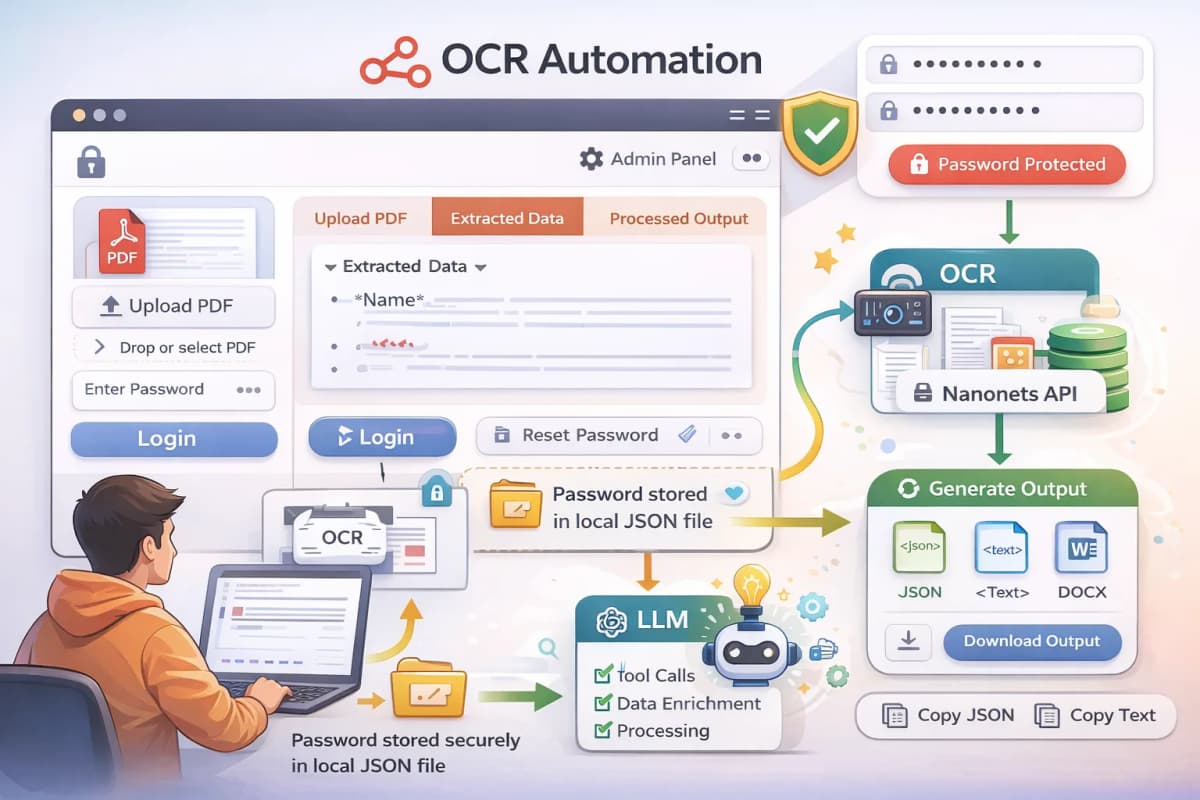
A sophisticated OCR automation platform that transforms PDF documents into structured, actionable data through a multi-stage AI-powered pipeline. The platform features a simple, secure UI with password protection using local JSON file storage (no database required), admin-level password reset capabilities, and an intelligent document processing workflow that combines OCR libraries, Nanonets API, and LLM tool calling to extract and structure information from complex documents.
- Type
- AI/ML Automation Tool
- Year
- 2025
- Status
- Delivered
- React
- Next.js
- TypeScript
- OCR Libraries
- Nanonets API
- OpenAI GPT
- LLM Tool Calling
- PDF Processing
- Markdown Conversion
- DOCX Generation
- Local JSON Storage
- File Upload
- Password Authentication
The story
The problem
Organizations struggle with manual document processing, unstructured PDF data extraction, and converting scanned documents into usable formats. Traditional OCR tools lack intelligent data structuring, multi-phase extraction capabilities, and the ability to handle complex document layouts. There's also a need for secure, lightweight password protection without database overhead.
The solution
Built a comprehensive OCR automation platform with a password-protected UI using local JSON file storage. Implemented a multi-phase extraction pipeline: PDF upload → OCR library text extraction → Markdown conversion → Nanonets API processing for enhanced data capture → LLM-powered processing with tool calls for intelligent structuring → Multi-format output generation (JSON, text, DOCX). The system includes admin access controls for password management and supports predefined document templates.
My approach
Designed a lightweight, secure architecture with local JSON-based password management. Implemented a multi-phase OCR pipeline that progressively enhances data extraction through OCR libraries, Nanonets API, and LLM tool calling. Created flexible output generation supporting multiple formats for maximum usability.
Goals
- Automate document processing end-to-end without manual intervention
- Extract structured data from unstructured PDF documents using AI
- Provide secure access control without database dependencies
- Generate multiple output formats for flexible data usage
- Enable admin-level password management and system control
What I built
Password Protection System
Lightweight authentication using local JSON file storage. Admin users have elevated privileges to reset passwords and manage access.
PDF Upload & Processing
Secure file upload interface with drag-and-drop support. Validates PDF format and initiates processing pipeline.
Multi-Phase OCR Extraction
Stage 1: OCR library extracts text from PDF. Stage 2: Converts to markdown format. Stage 3: Nanonets API processes document and captures additional details missed in previous phases.
LLM Processing Pipeline
Intelligent processing using LLM with tool calling capabilities. Performs multiple steps to structure and enhance extracted data, identifying patterns and relationships.
Output Generation
Generates structured outputs in multiple formats: JSON for programmatic use, plain text for readability, and DOCX documents in predefined templates for professional documentation.
Admin Dashboard
Admin-only interface for password management, system configuration, and access control. Allows password reset if unauthorized changes occur.
Key capabilities
- Multi-phase OCR extraction with progressive enhancement
- LLM-powered intelligent data structuring
- Tool calling for complex multi-step processing
- Local JSON-based password management (no database required)
- Admin-level password reset and access control
- Multiple output formats (JSON, text, DOCX)
- Predefined document templates for structured output
- Copy-paste functionality for quick data transfer
- Download capabilities for all output formats
Tech stack
Frontend
- React/Next.js - Modern UI framework with server-side rendering
- TypeScript - Type-safe development
- Tailwind CSS - Responsive styling
- File Upload Components - Drag-and-drop PDF upload
- Password Authentication UI - Secure login interface
Backend & infrastructure
- Next.js API Routes - Serverless backend logic
- Local JSON File Storage - Password and configuration management
- PDF Processing Libraries - Document parsing and extraction
- OCR Libraries - Text extraction from scanned documents
- Markdown Conversion - Structured text formatting
AI layer
- Nanonets API - Advanced OCR and data extraction
- OpenAI GPT Models - Intelligent data structuring
- LLM Tool Calling - Multi-step processing pipeline
- Structured Output Generation - JSON and text formatting
Payments & integrations
- Nanonets API - Enhanced OCR capabilities
- OpenAI API - LLM processing and tool calling
- DOCX Generation Library - Document export functionality
Architecture
- Lightweight architecture without database dependencies
- Local JSON file storage for configuration and passwords
- Modular processing pipeline with clear phase separation
- Secure password hashing and authentication
- Role-based access control (User vs Admin)
- API integration layer for external services (Nanonets, OpenAI)
- Error handling and validation at each processing stage
The result
- For Users: Simple, secure document processing, Multiple output formats, Copy-paste and download capabilities, No database overhead
- For Organizations: Automated document extraction, Structured data output, Reduced manual processing time, Cost-effective solution
- For Admins: Password management control, System configuration access, Security oversight, Easy password reset functionality